How to Get Valetax Rebates for Existing Account
To transfer your Valetax account to our IB, please follow these steps:
-
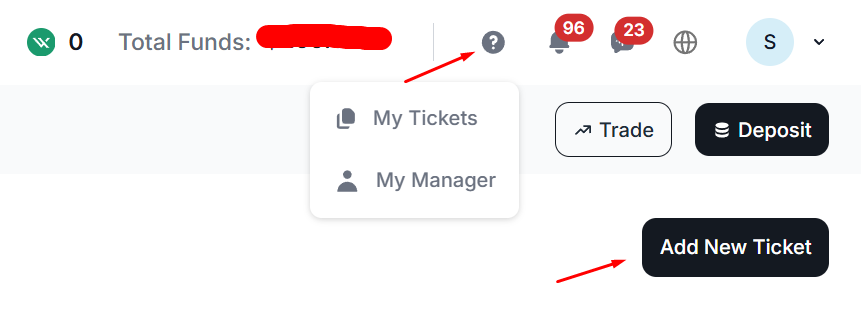
Log in to the Valetax Member Area, select the "My Tickets" menu, then click the "Add New Ticket" button, as shown in the image below:

-
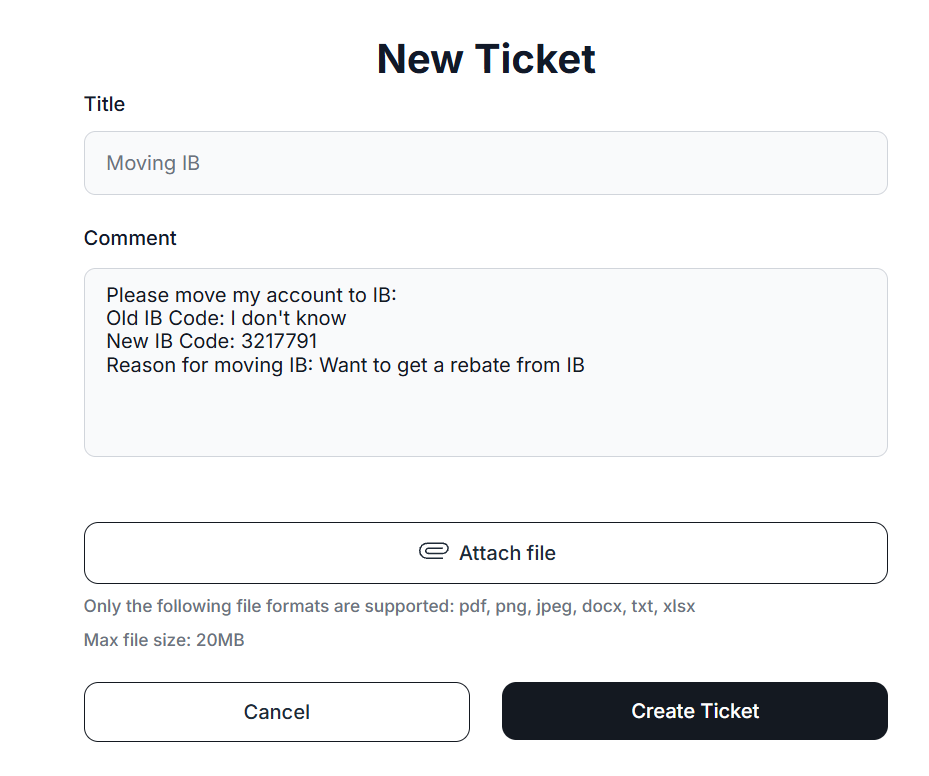
Fill out the support ticket with the following information:
Ticket Title: IB Transfer Request
Enter the following message in the comments section:
            Please transfer my account to the following IB:
            Old IB Code: I don't know
            New IB Code: 3217791
            Reason for IB transfer: I would like to receive rebates from this IB
The completed ticket should look like the image below. Then, click the "Create Ticket" button:
- Wait for a response from the Valetax support team. The request is usually processed within 2 business days.
- Once you have received confirmation that your trading account has been successfully transferred under our IB partnership, please validate your account in the MyPipsbackFX member area. To do this, go to the "Broker Account" menu and select "Trading Account Validation", if you are not yet a member, please signup here for free first.